OpenAI Adds Locked Chats to ChatGPT, Hiding Private Conversations Behind a Four-Digit PIN or Biometrics
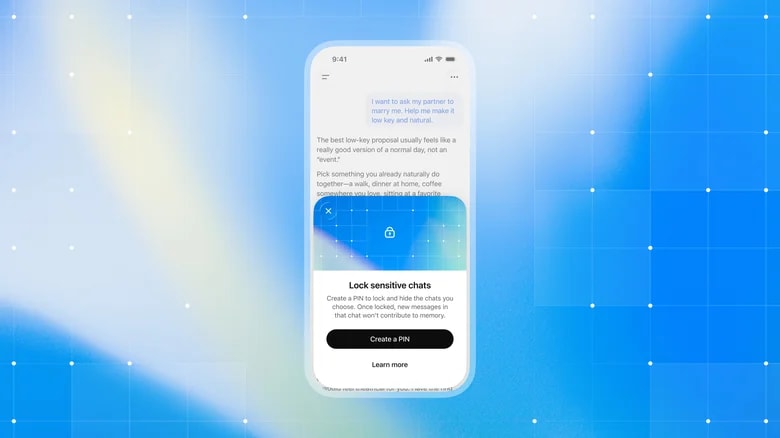
Image credit: OpenAI
OpenAI has started rolling out Locked Chats in ChatGPT, a feature that lets users secure individual conversations behind a four‑digit PIN. On supported devices, Face ID or Touch ID can be used instead. The company announced the feature on Tuesday, October 20, 2026, and said it is reaching users gradually.
Locked Chats is meant for moments when a user is discussing something personal or planning a surprise and wants to keep that conversation private while handing a device to friends or family to look at something in another chat.
Once a conversation is locked, it moves to a dedicated Locked Chats section. It no longer appears in the regular chat history, the pinned conversations list or ChatGPT search results. On the web and in desktop apps, opening the section requires the four‑digit PIN. On mobile, users can authenticate with Face ID, Touch ID or the device's biometric security instead.
Unlike Temporary Chats, which provide a separate session that does not appear in chat history, locked chats stay saved, and users can return to them at any time. Users who do not see a Lock chat option in the more‑options menu of an eligible chat may not have received the feature yet.
Locked chats can be used with voice mode on Android and iOS.
When Memory is turned on, the Locked Chats section has its own memory, shared across the conversations inside it. New messages sent after a chat is locked can update that memory but do not update regular Memory. OpenAI designed this so that information from locked chats does not appear in regular chats.
Resetting the PIN permanently deletes all locked chats, files and other content protected by the previous PIN. Customer support cannot recover them.
Several chat types cannot be locked. They are temporary chats, archived chats, group chats, chats created from a shared link, chats with scheduled tasks and chats with meeting recordings. Conversations in Codex also cannot be locked with this feature.
Locked Chats is available on the Free, Go, Plus, Pro, Business, Enterprise and Edu plans. It is not available in ChatGPT for Healthcare.
OpenAI states that locking a chat does not create end‑to‑end encryption or a separate encrypted vault. It also does not change how long OpenAI retains the chat, remove information that ChatGPT remembered before the chat was locked, or alter the Improve the model for everyone setting. The feature does not exempt OpenAI from legal obligations that apply to user data.
In practice, the lock controls who can see a conversation on the device or account in use. It does not change how the underlying data is stored or handled by OpenAI.
The feature had been spotted in development about two months before launch. Android Authority reported finding references to locked chats in a ChatGPT Android build, described as a way to keep saved conversations out of the sidebar, chat history and search results behind a PIN or fingerprint.
ChatGPT is increasingly used for personal conversations, which has put privacy controls under greater attention. Messaging apps have offered comparable tools for some time. WhatsApp, for example, introduced a Chat Lock feature that places selected threads in a separate folder that opens only after authentication.
Until now, ChatGPT users who wanted to keep a conversation out of their history could use Temporary Chats, which do not persist. Locked Chats adds an option for conversations that users want to keep, while keeping them out of everyday view.
Eligible users can open the more‑options menu on a saved conversation and choose Lock chat. The first time, they set a four‑digit PIN for the account. On supported mobile devices, biometric authentication can be used to open the section. Locked chats are then listed under Locked Chats, separate from the rest of the conversation list.
OpenAI says the rollout began on Tuesday and may not have reached every account. Details are published in its help documentation on using locked chats in ChatGPT.
Topics
Sources
Stay informed
Startup news in your inbox
Get important funding rounds, founder stories, and startup updates.
No spam - only important startup updates.
Comments
Text only. No links or images.
No comments yet.